Pages

You are ninga ! 🥷🏽

Dans un panier 🧺, il y a un fruit sans pepin (🍍🍑🍒🍌... )?

Réponse  mySome(basket, isSeedlessFruit); 


const basket = [
  { icon: "🍎", hasSeeds: true, color: "red", price: 1.2, category: "fruit" },
  {
    icon: "🥕",
    hasSeeds: false,
    color: "orange",
    price: 0.7,
    category: "vegetable",
  },
  {
    icon: "🍌",
    hasSeeds: false,
    color: "yellow",
    price: 1.0,
    category: "fruit",
  },
  {
    icon: "🥦",
    hasSeeds: false,
    color: "green",
    price: 1.8,
    category: "vegetable",
  },
  { icon: "🍓", hasSeeds: true, color: "red", price: 0.5, category: "fruit" },
  {
    icon: "🍆",
    hasSeeds: true,
    color: "purple",
    price: 2.1,
    category: "vegetable",
  },
  { icon: "🥝", hasSeeds: true, color: "green", price: 1.3, category: "fruit" },
  {
    icon: "🍍",
    hasSeeds: false,
    color: "yellow",
    price: 3.5,
    category: "fruit",
  },
];

const isSeedlessFruit = basketItem =>
        basketItem.category === "fruit" && !basketItem.hasSeeds;

const hasSeedlessFruit = mySome(basket, isSeedlessFruit); 


DS


  Les DS sont programmés en TD.


Présence obligatoire.

// ---------------------------------------------
// Basket: a mixed list of fruits and vegetables
// Each item has properties describing what it is
// ---------------------------------------------
const basket = [
  { icon: "🍎", hasSeeds: true,  color: "red",    weight: 180, sweetness: 6, price: 1.2, category: "fruit" },
  { icon: "🥕", hasSeeds: false, color: "orange", weight: 80,  sweetness: 4, price: 0.7, category: "vegetable" },
  { icon: "🍌", hasSeeds: false, color: "yellow", weight: 120, sweetness: 8, price: 1.0, category: "fruit" },
  { icon: "🥦", hasSeeds: false, color: "green",  weight: 300, sweetness: 3, price: 1.8, category: "vegetable" },
  { icon: "🍓", hasSeeds: true,  color: "red",    weight: 25,  sweetness: 9, price: 0.5, category: "fruit" },
  { icon: "🍆", hasSeeds: true,  color: "purple", weight: 250, sweetness: 2, price: 2.1, category: "vegetable" },
  { icon: "🥝", hasSeeds: true,  color: "green",  weight: 75,  sweetness: 7, price: 1.3, category: "fruit" },
  { icon: "🍍", hasSeeds: false, color: "yellow", weight: 900, sweetness: 5, price: 3.5, category: "fruit" }
];

/**
 * Custom implementation of Array.prototype.some()
 * ------------------------------------------------
 * @param {Array} array - the list we want to check
 * @param {Function} fxn - the test function applied to each element
 * @returns {boolean} - true if at least one element passes the test
 *
 * How it works:
 * - Loop through the array
 * - Apply the callback to each element
 * - If the callback returns true → stop and return true
 * - If no element matches → return false
 */
function mySome(array, fxn) {
  for (let i = 0; i < array.length; i++) {
    if (fxn(array[i])) {
      return true; // Found at least one matching item
    }
  }
  return false; // No match found
}

// ------------------------------------------------------
// Example 1: Check if the basket contains a vegetable
// Using a classic function expression
// ------------------------------------------------------
const hasVegetable = mySome(
  basket,
  function (basketItem) {
    return basketItem.category === "vegetable";
  }
);
console.log("Has vegetable?", hasVegetable); // true

// ------------------------------------------------------
// Example 2: Same test, but using an arrow function
// ------------------------------------------------------
const hasVegetable2 = mySome(
  basket,
  basketItem => basketItem.category === "vegetable"
);
console.log("Has vegetable?", hasVegetable2); // true

// ------------------------------------------------------
// Example 3: Store the callback in a variable
// ------------------------------------------------------
const hasVegetable3 = basketItem => basketItem.category === "vegetable";

const hasVegetable3Result = mySome(basket, hasVegetable3);

console.log("Has vegetable?", hasVegetable3Result); // true

// ------------------------------------------------------
// Example 4: Check if the basket contains an expensive item
// ------------------------------------------------------
const hasExpensiveItem = mySome(
  basket,
  basketItem => basketItem.price > 3
);
console.log("Has expensive item?", hasExpensiveItem); // true (🍍)

// ------------------------------------------------------
// Example 5: Check if the basket contains a seedless fruit
// ------------------------------------------------------
const seedlessFruit = mySome(
  basket,
  basketItem => basketItem.category === "fruit" && !basketItem.hasSeeds
);
console.log("Has seedless fruit?", seedlessFruit); // true (🍌, 🍍)


DS


Integrez cette vidéo dans votre site ! Comment la faire demarrer automatiquement ?

DOM


🥷🏿Parcours l'arbre du DOM

<body>
<p class="premier">Para 1</p>
<p><em>second </em> Para 2</p>
<p id="dernier"> dernier Para</p>
<!-- je suis un commentaire -->
</body>

https://dupontdenis.github.io/parcoursArbreGenerator/


Cours JS


🥷 https://javascript.info/


Browser: Document, Events, Interfaces


LE DOM


Interface/fonctionnalité


Interface

Le code de l'interface 


Fonctionnalité


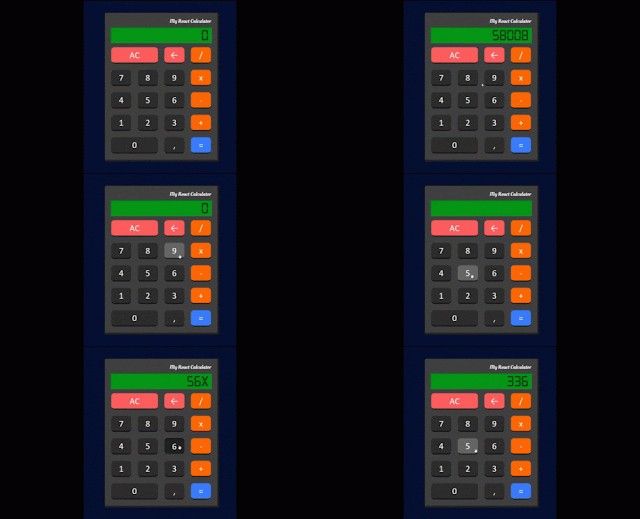
Cas de la calculette ! 


Clonez le code de l'interface


DOM


🖋️DOM


Travail personel sur le DOM

Property / MethodDescription
element.appendChild()Adds a new child node, to an element, as the last child node
element.attributesReturns a NamedNodeMap of an element's attributes
element.childElementCountReturns the number of child elements an element has
element.childNodesReturns a collection of an element's child nodes (including text and comment nodes)
element.childrenReturns a collection of an element's child element (excluding text and comment nodes)
element.classListReturns the class name(s) of an element
element.classNameSets or returns the value of the class attribute of an element
element.cloneNode()Clones an element
element.contains()Returns true if a node is a descendant of a node, otherwise false
element.contentEditableSets or returns whether the content of an element is editable or not
element.firstChildReturns the first child node of an element
element.firstElementChildReturns the first child element of an element
element.getAttribute()Returns the specified attribute value of an element node
element.getAttributeNode()Returns the specified attribute node
element.getElementsByClassName()Returns a collection of all child elements with the specified class name
element.getElementsByTagName()Returns a collection of all child elements with the specified tag name
element.hasChildNodes()Returns true if an element has any child nodes, otherwise false
element.idSets or returns the value of the id attribute of an element
element.innerHTMLSets or returns the content of an element
element.insertBefore()Inserts a new child node before a specified, existing, child node
element.lastChildReturns the last child node of an element
element.lastElementChildReturns the last child element of an element
element.nextSiblingReturns the next node at the same node tree level
element.nextElementSiblingReturns the next element at the same node tree level
element.nodeNameReturns the name of a node
element.nodeTypeReturns the node type of a node
element.nodeValueSets or returns the value of a node
element.parentNodeReturns the parent node of an element
element.parentElementReturns the parent element node of an element
element.previousSiblingReturns the previous node at the same node tree level
element.previousElementSiblingReturns the previous element at the same node tree level
element.querySelector()Returns the first child element that matches a specified CSS selector(s) of an element
element.querySelectorAll()Returns all child elements that matches a specified CSS selector(s) of an element
element.removeAttribute()Removes a specified attribute from an element
element.removeChild()Removes a child node from an element
element.replaceChild()Replaces a child node in an element
element.setAttribute()Sets or changes the specified attribute, to the specified value
element.setAttributeNode()Sets or changes the specified attribute node
element.styleSets or returns the value of the style attribute of an element
element.tagNameReturns the tag name of an element
element.textContentSets or returns the textual content of a node and its descendants
nodelist.item()Returns the node at the specified index in a NodeList
nodelist.lengthReturns the number of nodes in a NodeList

Solution rendre la money !

 lien

Rendre la monnaie !


Il est facile de trouver comment rendre 33€ en utilisant des pièces de 5,3 et 1.

En effet, il suffit de décomposer 33 sous la forme [ 33 = 5x + 2y + 1z ].


Improve your skill

 Passons maintenant aux questions suivantes : 


🦜Quels codes donnent les nombres : 
  1. pairs,
  2. impairs,
  3. positifs,
  4. négatifs
  5. multiples de 2
  6. et patati et patata !

DM : Recherche le code !


Donnez le code d'une fonction qui recherche une sequence dans une autre ! 

recherche("AATC", "AATAAATCAAA");

> AATA****AAA


Vidéo


Integrez cette vidéo dans votre site ! Comment la faire demarrer automatiquement ?

🪛Au boulot !


Improve your skill

code :


Création d'une bibliothèque de fonctions.


VStudio code / snippet

 dans visual tapez : for et recherchez


Magie ! 

cours


const pizzas = [ { name:"queen", price: 12, ingredients: ["🐷","🍄","🍅","🧀"] }, { name:"cheese", price: 8, ingredients: ["🧀","🍅"] }, { name:"oriental", price: 14, ingredients: ["🍅","🐑","🍄","🌶"] }, { name:"royal", price: 9, ingredients: ["🍅","🌵"] }, ];


Trouvez les pizzas avec du 🧀 Trouvez les pizzas avec du 🍅


Commencez par vous poser les questions

const ingredients = ["🍅", "🐷", "🍄", "🧀"]; ingredients a "🍅"; // true ingredients a "🌶"; // false


DS

 Sujet A : 

Sujet B

Sujet C

Sujet D

Sujet E

Recherche dans un tableau !

 Recherche min


Recherche min/max


Quoi ?

⚠️ { id: 1, name: "Alice" } === { id: 1, name: "Alice" } // false


Vous comprenez ??? 


🛟🪡Les références : lien


Retirer les doublons d'un tableau d'objets : https://dupontdenis.github.io/uniqueInPlace-Object/

Unique : supprimer les doublons !

Un algorithme qui supprime les doublons d’un tableau est simplement une procédure qui parcourt les éléments et ne conserve qu’une seule occurrence de chaque valeur afin d’obtenir un tableau composée uniquement d’éléments uniques.


🪛En action

L’algorithme crée un nouveau tableau et laisse l’original intact.

https://dupontdenis.github.io/uniqueNewPlace/


Un algorithme qui supprime les doublons in‑place modifie le tableau existant et réorganise ses éléments pour éliminer les répétitions, sans allouer un second tableau.

🥇https://dupontdenis.github.io/uniqueInPlace-end/


https://dupontdenis.github.io/uniqueInPlace/


Explications

🛟 help

Lecture :

🪡Les références : lien

📦Les tableaux :  lien


➿Les boucles : lien 

🪛Les fonction sur le tableaux : lien


5 fruits, 5 légumes : lien

Algorithmique


🪛Trouvez une idée (un algorithme) permettant de mettre les dupond à gauche et les dupont à droite !


Cours JS

Installation de nodejs 🪛 Installation de nodejs


Cours 👍 Cours JS

Lien : https://dupontes6.blogspot.com/

JS 10%